
Google Just Turned On AI Face and Voice Cloning for Your Company’s Workspace Account. Here’s How to Turn It Off.
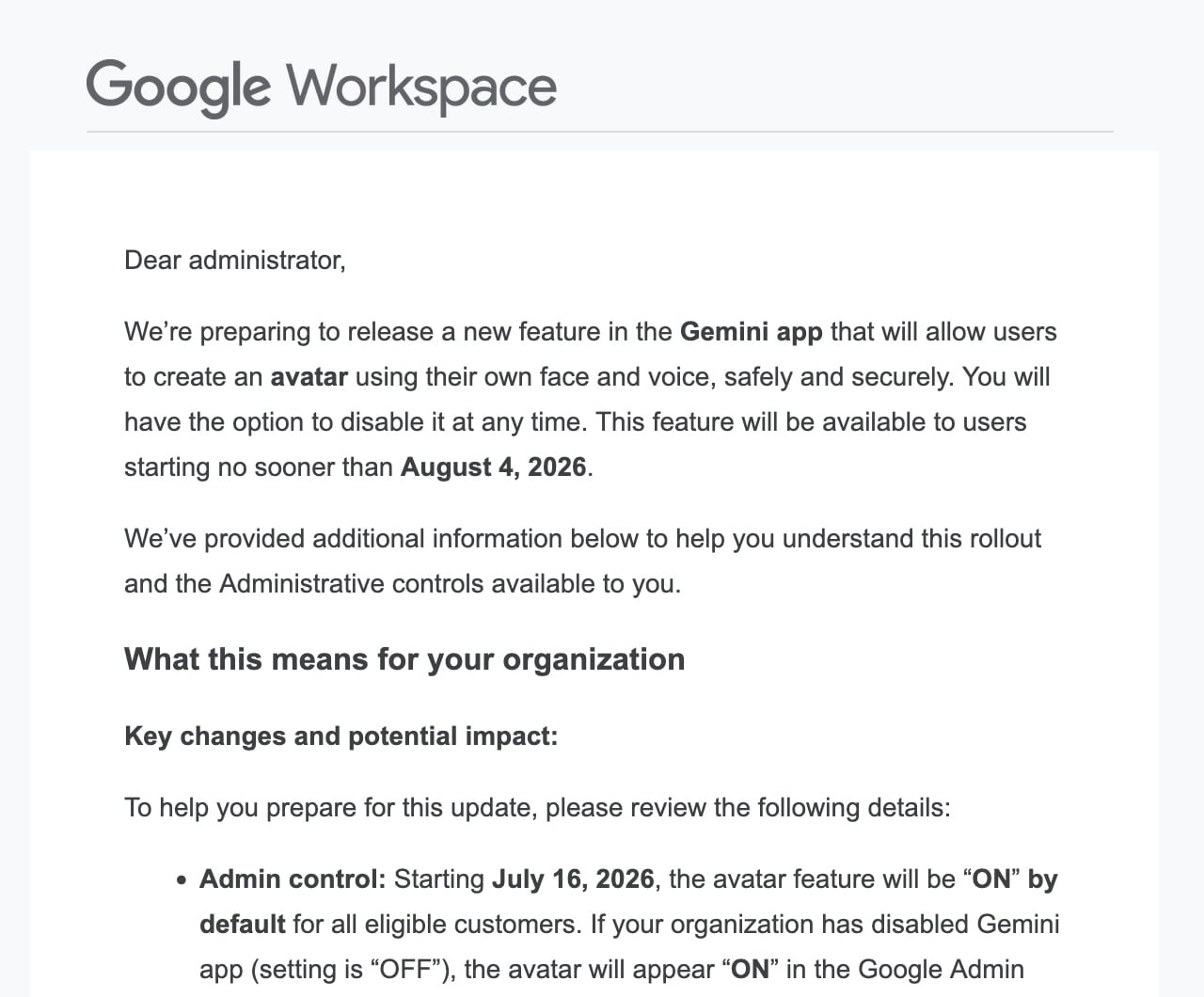
If you are a Google Workspace administrator, you probably received an email this morning from Google's Workspace Team with the subject line "[Action Advised] Manage access for new Gemini app avatar feature." If you skimmed it and moved on with your day, go back and read it again. This one deserves your attention.
Google is rolling out a new feature in the Gemini app that allows users to create an AI-generated avatar using their own face and voice. The feature scans a short video recording of your face, captures your voice, and then generates a digital clone of you that can speak any script you give it. It replicates your facial expressions, your voice inflections, and your speech patterns.
And as of today, July 16, 2026, this feature is turned ON by default for every eligible Google Workspace customer.
What This Feature Actually Does
The Gemini avatar tool lets users record a short selfie video and voice sample through their phone's camera. Google's AI then builds a digital version of that person, complete with their face and voice, that can be inserted into AI-generated videos. The clone speaks whatever script you type in. It moves, gestures, and pauses like a real person.
Google says recordings are stored securely in the user's Google Account, and they say they do not use the recordings to train their generative AI models (except to address abuse or harm). Recordings are automatically deleted after three years of inactivity.
But here is what should concern every business owner and every organization that manages employee accounts: this feature is now live for your users unless you take action to disable it. Any eligible user on your Workspace account, meaning anyone 18 or older with English set as their primary language, can now walk through the avatar creation process and hand Google a biometric profile of their face and voice.
Why This Should Concern You
For solo practitioners, founders, small and mid-sized businesses, creators, or anyone managing a Google Workspace account for their organization, there are several layers of concern here.
First, biometric data is some of the most sensitive personal information that exists. Unlike a password, you cannot change your face or your voice if that data is compromised. Several states, including Illinois, Texas, and Washington, have biometric privacy laws that impose obligations on organizations that collect or store biometric identifiers. If your employees or team members use this feature through your Workspace account, you need to understand what that means for your compliance obligations and liability risks.
Second, the potential for misuse is real. If someone gains access to a user's Google Account, they could potentially access that person's avatar recordings. AI-generated deepfake videos are already a growing problem for fraud, impersonation, and misinformation. Making it easier to create realistic digital clones of real people, even with safeguards like watermarking, adds fuel to that fire.
Third, Google's track record on opt-in versus opt-out is not reassuring. In October 2025, Google was sued for allegedly enabling Gemini features by default across Gmail, Google Chat, and Google Meet without user consent. That lawsuit alleged Google buried the opt-out controls deep within privacy settings. This latest rollout follows the same playbook: the feature is on by default, and the burden falls on the administrator to disable it.
The takeaway is that you should be regularly auditing your organization's privacy and AI settings to make sure Google hasn't turned something back on or added a new feature that is by default on without your permission.

How to Disable the Gemini Avatar Feature
If you want to turn this off for your organization, you need to do it before August 4, 2026, when the feature becomes available to end users. Here are the steps:
- Log in to your Google Admin console (admin.google.com).
- Navigate to Generative AI, then Gemini app, then My Avatar in Gemini.
- Uncheck the setting.
- Click Save.
Google notes that the avatar setting is rolling out now and will be visible to all admins by July 21, 2026. If you do not see the setting yet, check back before the end of next week.
If you want to allow the feature for some users but not others, you can configure it at the organizational unit or group level within your Admin console.
If You Are Not a Workspace Administrator
If you use a personal Google account with a paid Google AI plan, the avatar feature may also be available to you. You can manage your avatar data through the Data & Privacy tab of your Google Account settings. You can delete your avatar recordings at any time from your Gemini settings.
If you are an employee using a Workspace account managed by your company, whether you have access to this feature depends on what your administrator decides. If you have concerns about it, now would be a good time to raise them with whoever manages your organization's Google Workspace.
The Bigger Picture
We are in a moment where AI companies are moving fast and asking questions later. The pattern is consistent: roll out the feature, turn it on by default, and make the opt-out the user's responsibility. For individuals and organizations that worry about the risks of mishandling data privacy, biometric security, and informed consent, that approach is not good enough.
Whether or not you choose to use the Gemini avatar feature, you should be making that choice intentionally, not discovering it was made for you.
Take five minutes today. Log in to your Admin console. Decide whether this is something you want enabled for your organization. And if the answer is no, turn it off before August 4. If the option "Generative AI > Gemini app > My Avatar in Gemini" is not visible yet, it has not been activated in your account. Keep checking daily until you see it. Again, Google has confirmed the setting will be visible to all account administrators by July 21, 2026.
Jessica Eaves Mathews is an award-winning attorney, AI governance expert, and founder of Leverage Legal Group, a trademark, copyright, AI, and digital regulatory compliance law firm focused on protecting founders, startups, small and mid-sized businesses, and independent creators. With 30 years of experience at the intersection of law, business, and innovation, she advises clients on AI, intellectual property and brand protection, and global compliance. Jessica holds an LLM in Global Business Law from Columbia Law School and an AI certification from the AI, Tech & Privacy Academy. A dynamic speaker and podcast host, she translates complex legal topics into actionable insights for professionals and entrepreneurs. She writes about trademark law, copyright, AI, and brand protection at leveragelegalgroup.com and on LinkedIn.